
In the evolving landscape of cybersecurity, traditional passwords are becoming a liability. Weak, reused, or stolen passwords are often the entry point for cyberattacks, putting both individuals and organizations at risk. Enter passkeys, a modern and more secure way to authenticate users without relying on passwords. Passkeys leverage cryptographic authentication to ensure stronger protection while simplifying the login experience. While they may sound foreign and advanced – you’ve probably already been using them for years.
Passkey Basics
A passkey is a form of multifactor authentication (MFA) – also known as two-factor authentication or 2FA – that relies on multiple different factors to authenticate the user with a central authority. The types of authentication factors are composed of:
- Knowledge: Something you know, like a username and password
- Possession: Something you have, like a smart card or security token
- Inherence: Something you are, like a fingerprint, voice, or iris pattern
Forms of authentication that you are probably familiar with already include biometrics – like a fingerprint or your facial features, passwords or patterns and physical devices – like USB keys or smartphones. MFA relies on these different types of information to securely identify individuals who are trying to access sensitive data as it is less likely for third parties to have access to more than one “factor”.
How Passkeys Work
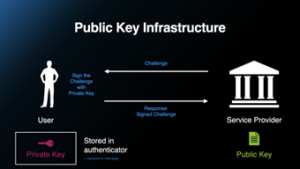
Unlike passwords, passkeys use public-key cryptography to verify a user’s identity. When you create a passkey (say to log into your Google account), your device generates two keys:
- A private key, stored securely on your device and never shared.
- A public key, sent to the service you’re logging into – usually stored on a remote server.
 During authentication, the user’s device uses the private key to sign a challenge sent by the service, and the service verifies the signature using the stored public key, effectively proving the user’s identity without ever exposing the private key itself; this process relies on asymmetric cryptography, making passkeys a secure method for passwordless authentication. Since the private key never leaves your device, attackers can’t steal it through phishing, brute-force attacks, or data breaches. Many passkeys also integrate with biometric authentication (like Face ID or fingerprint scanning), making the login process both seamless and secure.
Why Organizations Need Passkeys
For businesses, weak passwords are a major security risk, leading to data breaches, financial losses, and compliance issues. Passkeys help to reduce these risks by eliminating passwords altogether. They also improve user experience – employees don’t have to remember complex passwords or reset them frequently – reducing IT help desk costs. With major tech companies like Google, Apple, and Microsoft adopting passkeys, businesses that embrace this technology will be ahead of the curve in security.
Added Security via Physical Touch Passkeys
The Collier County Clerk of Courts employs a phishing-resistant authentication method that uses touch passkeys. These touch passkeys use leading industry standards to thwart situations where an attacker tries to intercept a login remotely. Essentially, without the physical passkey in their possession the attacker can’t proceed.